

Claude Skills Starter Guide
How and When to Use Claude Skills

If you get tired of always having to repeat the same things to Claude, you need to start using Skills! When I first encountered Claude Skills, I thought they were just another take on custom instructions. I was wrong. Skills represent something more fundamental: a way to give Claude specialized knowledge that persists across conversations, turning a generalist AI into a domain expert whenever you need one.
Think of Skills as portable expertise modules. Instead of explaining your company’s brand voice every single time you draft a post, or re-teaching Claude your coding standards whenever you start a new project, you package that knowledge once. Then Claude carries it forward, applying those guidelines automatically whenever the context calls for it.
And now, with Open AI Codex Agent Skills, this capability extends beyond Claude alone. Agent Skills work across multiple AI platforms, Claude, ChatGPT, and others, creating truly portable expertise that follows you regardless of which AI you’re using for a particular task.
In this article, I will show all you need to get started with Claude Skills and the next one, I will do the same for Agent Skills.
What Are Claude Skills?
At their core, Skills are structured knowledge files that extend Claude’s capabilities in specific domains. They live in your workspace as markdown files containing detailed instructions, examples, workflows, and domain-specific knowledge that Claude references when relevant to your task.
The structure is deliberately simple. Each Skill consists of a SKILL.md file that contains everything Claude needs to know about that particular domain. You might have a “Brand Voice” skill with your company’s tone guidelines and sample copy, a “SQL Query Optimization” skill with your database schema and performance patterns, or a “Meeting Notes” skill that structures your notes according to your team’s format.
What makes Skills powerful other than the instructions themselves, is that Claude knows when to apply them. You don’t activate Skills manually or remind Claude to use them. When you start working on a task that matches a Skill’s domain, Claude automatically references that knowledge. This creates something closer to working with a colleague who remembers your preferences than an AI that needs constant reminding.
The key difference from simply pasting instructions into every conversation is persistence and context awareness. Skills become part of Claude’s working knowledge for your workspace. They’re always available, always consistent, and they evolve as you refine them over time.
Skills vs. Custom GPTs vs. Gems
The landscape of AI customization tools has gotten crowded, and understanding what distinguishes each approach is important when choosing the right tool.
Custom GPTs, available in ChatGPT, are essentially pre-configured chatbots. You set up instructions, upload reference files, and optionally connect external tools. Each Custom GPT is a separate entity you explicitly choose to engage with. If you want legal advice, you open your Legal Research GPT. If you need coding help, you switch to your Development GPT. They’re useful but siloed. You’re managing multiple AI assistants rather than building unified expertise.
Gems in Gemini are simpler. They’re saved conversation starters with specific instructions. You might have a “Debug My Code” Gem that tells Gemini to focus on finding errors systematically, or a “Brainstorm Ideas” Gem that encourages lateral thinking. They’re lightweight and valuable for recurring conversation patterns, but they’re primarily about setting the tone and approach for a conversation, not embedding deep domain knowledge.
Skills occupy different territory. They’re not separate assistants you choose between, and they’re not just conversation templates. They’re specialized knowledge that Claude accesses automatically when your work requires it. You’re not switching between different versions of Claude. You’re giving a single Claude instance expert-level knowledge across multiple domains that it applies contextually.
This is important, because with Custom GPTs, you need to decide in advance which specialized assistant to engage. With Skills, you just start working and Claude draws on relevant expertise as needed. You might be drafting a technical proposal where Claude references your “Technical Writing” Skill for structure, your “Product Specs” Skill for accuracy, and your “Brand Voice” Skill for tone, all within the same conversation. You’re not juggling multiple tools. You’re working with an AI that has access to your organizational knowledge.
How to Create Claude Skills
Creating Claude Skills
The first thing to know, is that you need a Paid account in Claude to create Skills. It is not available in the Free version.
Then, go to:
https://claude.ai/settings/capabilitiesYou will see what Skills are available for you. Claude has a set of pre configured skills that you can enable with the toggle. The only one that is toggled on by default is the skill-creator, that allows you to create a skill within the chat interface.
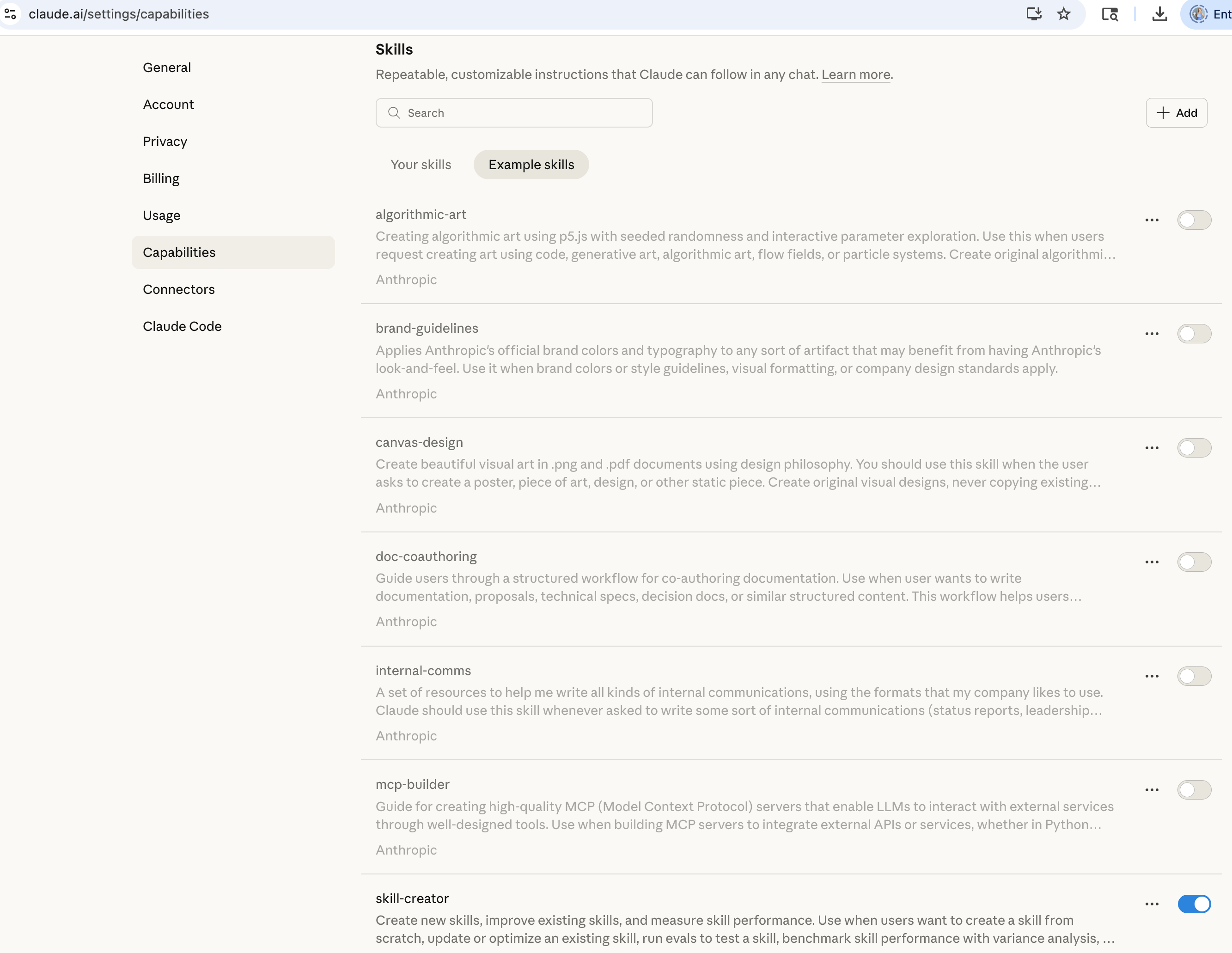
You can create this file in 3 different ways:
Using Claude skill-creator
Writing your own SKILL.md files
Uploading Skills that someone made available in a repository.
How to use Claude Skill-Creator
You can click on the +Add in the Skills menu in Settings > Capabilities, and it will open this menu, then you click Create with Claude:
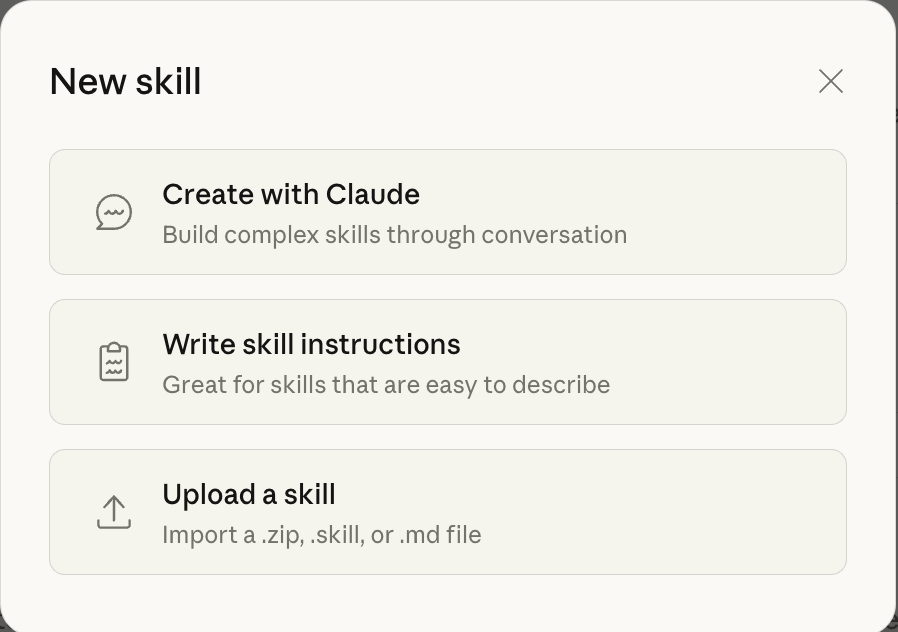
Or you can simply open the Claude.ai chat window and type:
Hey Claude—can you make something amazing with my "skill-creator" skill?Claude will create the files for you. If you have something in mind, like your Brand Guidelines, you can ask Claude to create that too.
How to create a SKILL.md file
Start by identifying a task you repeat frequently where you find yourself giving Claude the same context over and over. Maybe you’re constantly explaining your code review standards, or repeatedly describing how your team structures project briefs, or continuously reminding Claude about your company’s brand voice.
Create a new file called SKILL.md in your preferred text editor or use the Write Skills Instructions in Claude.
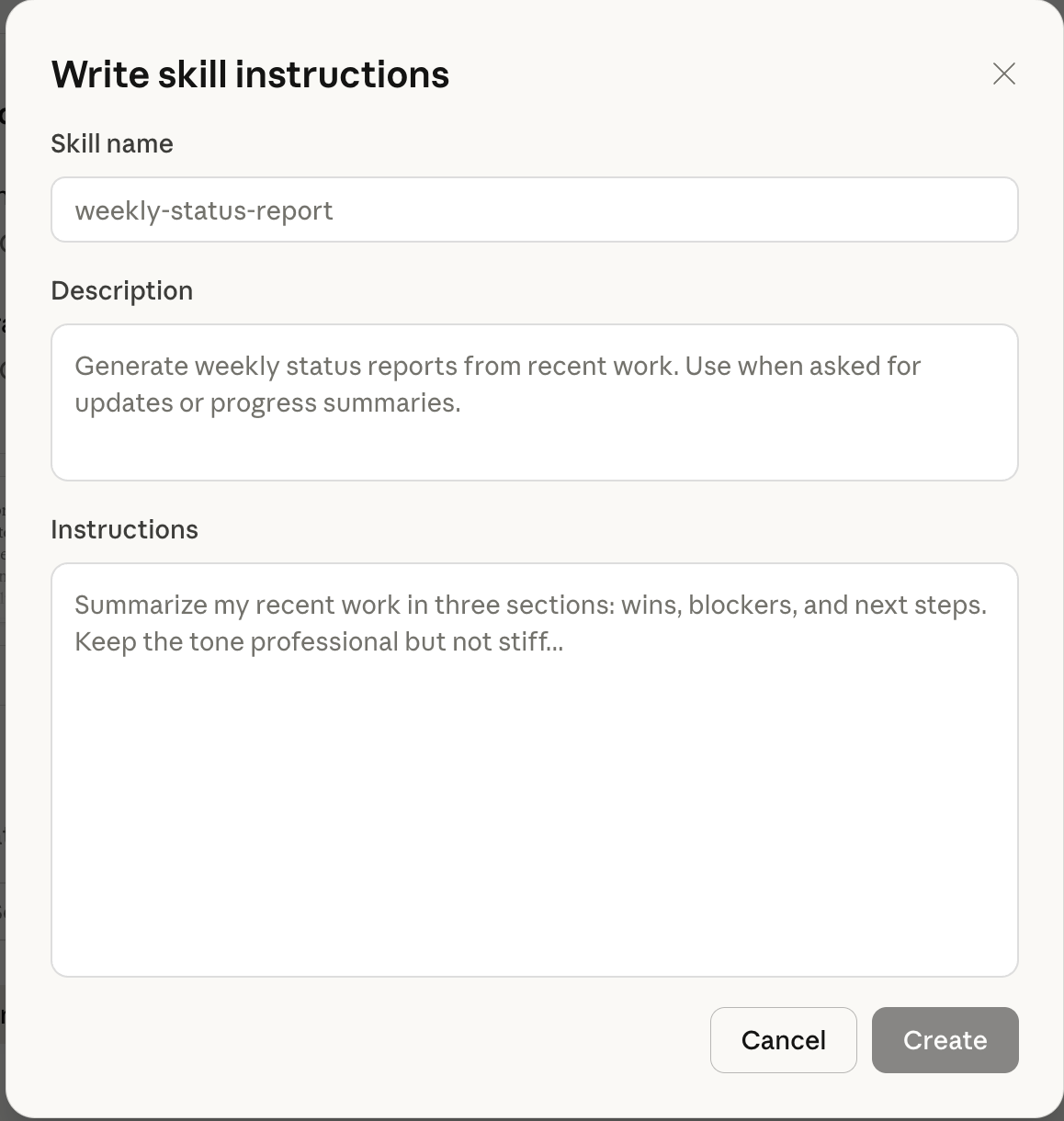
Begin with a clear description section that tells Claude what this Skill covers and when to apply it. For example, a Brand Voice and Writing Standards Skill might start with: “This Skill defines the brand voice, writing rules, and quality standards to apply when creating written content. Apply this Skill whenever drafting articles, newsletters, social posts, internal documents, or long-form writing intended for publication.”
The next section should contain your core instructions or knowledge. This is where you include the details Claude needs. For a brand voice Skill, you’d include tone guidelines, example phrases, words to avoid, and sample content. For a technical Skill, you might include architecture diagrams, naming conventions, common patterns, and anti-patterns to watch for.
Examples are crucial. Claude learns better from showing than telling. Instead of just saying “use active voice,” include before and after examples. Instead of listing coding standards, show code snippets that demonstrate those standards in practice. The more concrete your examples, the better Claude can pattern-match when applying the Skill.
Finally, include any workflows or decision trees the Skill requires. If your Skill is about incident response, walk through the triage process step by step. If it’s about content approval, outline the criteria Claude should check before considering something complete.
Here’s an example for a Brand Voice and Writing Standards .md file that you can copy and paste:
# SKILL: Brand Voice and Writing Standards

## Description

This Skill defines the brand voice, writing rules, and quality standards to apply when creating written content. Apply this Skill whenever drafting articles, newsletters, social posts, internal documents, or long-form writing intended for publication.

The goal is consistency, clarity, and credibility across all content.

---

## Brand Voice Principles

All writing must follow these principles:

- Write in clear, direct language.
- Use full sentences and cohesive paragraphs.
- Maintain a thoughtful, confident tone without sounding promotional.
- Avoid hype, exaggeration, or dramatic framing.
- Prioritize accuracy over speed.
- Explain ideas plainly without simplifying them to the point of losing meaning.

The voice should feel informed, grounded, and human, as if written by a domain expert speaking to peers.

---

## Tone and Style Guidelines

### Sentence Structure
- Prefer complete sentences over fragments.
- Vary sentence length naturally, but avoid choppy or overly short lines.
- Build paragraphs around a single idea and develop it fully.

### Word Choice
- Use everyday language where possible.
- Avoid buzzwords, slogans, and marketing phrases.
- Do not use dramatic metaphors or exaggerated claims.
- Avoid filler phrases such as “in today’s world,” “now more than ever,” or similar constructions.

### Point of View
- Use a neutral, professional first-person or third-person voice when appropriate.
- Do not sound instructional unless the content is explicitly a guide.
- Avoid talking down to the reader.

---

## Words and Phrases to Avoid

Avoid language that feels promotional, vague, or inflated. Examples include:

- “game-changing”
- “next-level”
- “cutting-edge”
- “seamless”
- “transformative”
- “powerful solution”

If a concept is valuable, explain why through reasoning and examples instead of labels.

---

## Examples

### Example 1: Tone Adjustment

**Before**
“Our innovative platform delivers powerful insights that help teams move faster than ever before.”

**After**
“This platform helps teams analyze their data more efficiently and make decisions with fewer assumptions.”

---

### Example 2: Clarity Over Hype

**Before**
“This approach radically changes how organizations think about AI adoption.”

**After**
“This approach changes how organizations plan, test, and support AI use over time.”

---

### Example 3: Paragraph Structure

**Before**
“AI adoption is complex. Many companies struggle. Tools alone are not enough.”

**After**
“AI adoption is complex because tools alone do not change how people work. Many organizations invest in technology without addressing the habits, support systems, and expectations that shape daily use.”

---

## Content Quality Checklist

Before considering any content complete, verify that:

- The main idea is clear within the first paragraph.
- Claims are supported by explanation, evidence, or examples.
- The tone remains consistent throughout the piece.
- Sentences flow naturally when read aloud.
- No banned or promotional language is present.

If any of these checks fail, revise before finalizing.

---

## When Not to Apply This Skill

Do not apply this Skill to:
- Informal chats or brainstorming sessions
- Drafts explicitly marked as rough notes
- Content where a different, pre-defined voice is required

---

## Final Instruction

When this Skill is active, default to clarity, precision, and substance. If there is a tradeoff between sounding impressive and being accurate, choose accuracy every time.
This will save your SKILL.md file to the appropriate location in your Claude workspace if you are using Claude to do this, but you can also save that in your local drive if you want to upload this later.
How to upload skills created by you or others
In the same menu that you can find in Settings > Capabilities > Skills > +Add you have the option to Upload Skill:
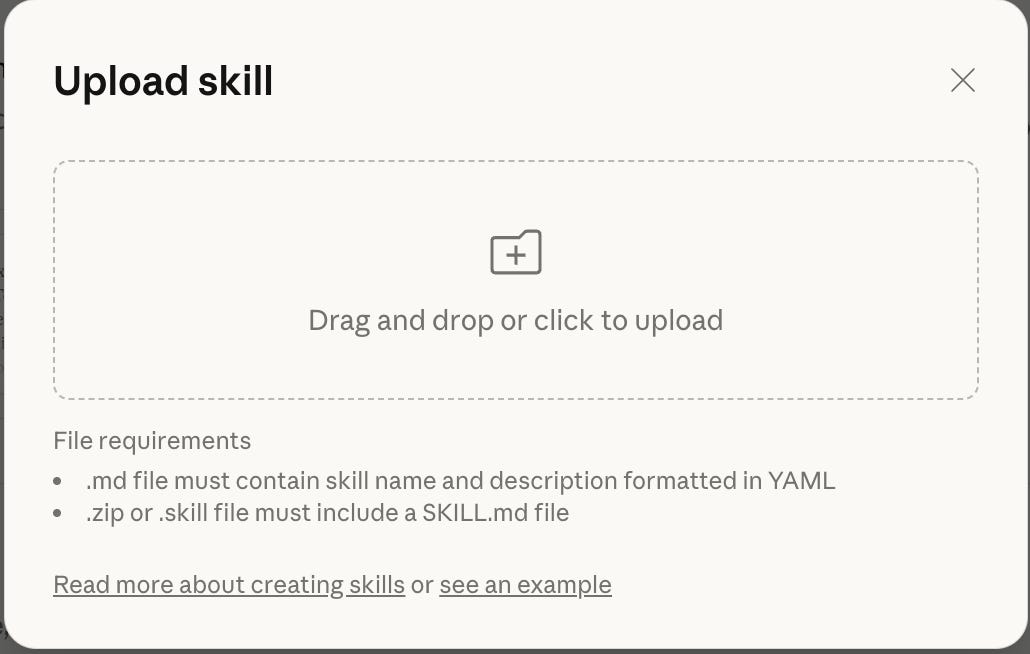
Once you upload the file, it will appear in your list of Skills and it will be ready to use. Simple like that!
Repositories of Skills
There are many companies and individuals making Skills available. Please, be careful when downloading these Skills from people you don’t know. Read the last section in this article: A note of caution and security risks on Claude Skills
Here are a couple of official repositories:
Notion Skills
Anthropic Skills
OpenAI
When to Use Claude Skills
The decision to create a Skill versus just giving Claude instructions in the moment comes down to repetition and complexity. Skills make sense when you’re solving the same class of problem repeatedly, when the knowledge required is substantial enough that re-explaining it wastes time, or when consistency across multiple conversations is important.
Consider creating a Skill when you notice yourself pasting the same context into conversations regularly. If you’re starting every code review with the same standards document, or beginning every content draft with the same style guide, that repeated context is a strong signal that a Skill would serve you better.
Skills particularly shine for organizational knowledge that needs to remain consistent. Your company’s brand voice shouldn’t drift conversation to conversation. Your security review criteria shouldn’t vary based on how you phrase the question. Your meeting note structure shouldn’t change weekly. Skills ensure Claude applies this knowledge uniformly.
Complex domains with nuanced guidelines benefit from Skills because you can layer in the subtlety that gets lost in quick instructions. A comprehensive SQL Skill might include not just syntax but performance considerations, security patterns, common pitfalls with your specific database setup, and examples of well-structured versus problematic queries. That level of detail doesn’t fit naturally into conversational instructions.
Avoid creating Skills for one-off tasks or simple preferences that Claude handles well with basic instructions. If you only need to explain something once, a Skill is overhead. If your requirement is straightforward enough to express in a sentence or two, conversational guidance works fine. Skills are for knowledge that’s too important to leave implicit and too complex to repeat constantly.
How to Use Claude Skills
Once created, Skills operate mostly invisibly. You work naturally, and Claude references relevant Skills when your task calls for their expertise. This automatic activation is the point. You’re not managing which Skills to apply. You’re just working, and Claude brings in the right knowledge.
That said, understanding how to leverage Skills effectively means recognizing when Claude isn’t applying a Skill you expected it would. If you start working on a task where a Skill should activate but Claude seems unaware of those guidelines, you can explicitly reference the Skill by name to prompt its use. This is usually a sign your Skill’s description or trigger conditions need refinement.
You can also layer multiple Skills in a single conversation. If you’re writing technical documentation, Claude might draw on a “Technical Accuracy” Skill for content correctness, a “Documentation Standards” Skill for structure, and a “Brand Voice” Skill for tone. You don’t orchestrate this layering manually. Claude applies relevant Skills based on what your task requires.
The real leverage comes from treating Skills as living documents. When you notice Claude misinterpreting a guideline or when your standards evolve, update the Skill file. Those refinements immediately improve every future conversation that uses that Skill. You’re not just fixing one interaction. You’re improving Claude’s performance across all relevant work.
Organizing Skills by domain rather than by task creates more reusable expertise. A “Customer Support” Skill that covers tone, common issues, escalation paths, and response templates serves multiple use cases. You’ll reference it whether you’re drafting a response, analyzing support trends, or training new procedures. Narrow, task-specific Skills tend to proliferate without adding proportional value.
Building a Library of Skills
Strategic Skill development follows a recipe: start with your highest-frequency needs, validate each Skill through real use, then expand into adjacent domains where consistent expertise is crucial.
Most people discover their first essential Skills through annoyance. What context are you repeatedly explaining to Claude? Where do you find yourself correcting the same misunderstandings conversation after conversation? Those pain points identify your highest-value Skill opportunities.
I recommend beginning with three to five core Skills that cover your most common work. For a content creator, that might be brand voice, SEO optimization, and editorial standards. For a developer, perhaps code review criteria, architecture patterns, and documentation format. For a product manager, maybe feature specification structure, stakeholder communication templates, and prioritization frameworks.
Build each Skill incrementally. Start with a basic version containing your core guidelines and a few examples. Use it in real work. Notice where Claude applies it well and where it falls short. Refine the Skill based on those observations. This iterative approach produces better Skills than trying to write comprehensive documentation upfront.
As your core Skills stabilize, expand into specialized domains where occasional deep expertise matters. These might include compliance requirements for specific regulatory environments, technical specifications for niche tools in your stack, or formatting standards for particular document types. You won’t use these Skills daily, but when you need them, having that expertise readily available saves substantial time.
Maintain a lightweight organization system. If you’re managing dozens of Skills, group them logically. You might have folders for “Writing and Communication,” “Technical Development,” “Business Operations,” and “Compliance and Legal.” The goal isn’t elaborate taxonomy. It’s being able to find and update Skills easily.
Review your Skill library periodically. Some Skills become obsolete as your work changes or as Claude’s base capabilities improve. Others need updates as standards evolve. Quarterly reviews keep your library relevant without becoming maintenance overhead.
The most effective Skill libraries reflect actual work patterns rather than theoretical comprehensiveness. Resist the urge to create Skills for everything you might someday need. Build Skills that solve problems you’re encountering now, and expand as genuine needs emerge.
Examples of Claude Skills
Seeing concrete Skills helps clarify both structure and scope. Here are several examples across different domains that demonstrate how Skills translate knowledge into usable expertise.
Brand Voice and Style Skill
A marketing team’s Skill might include tone guidelines, vocabulary preferences, example social posts, and common phrases to avoid. It would specify whether the brand uses contractions, how to balance professionalism with approachability, and sample posts demonstrating the voice across different contexts. When Claude drafts any marketing content, it applies these standards automatically without the team explaining their voice guidelines repeatedly.
SQL Database Skill
A data team’s Skill contains their database schema, table relationships, indexing strategy, and query optimization patterns specific to their setup. It includes examples of well-structured queries for common analysis patterns and highlights performance antipatterns they’ve encountered. When analysts work with Claude on queries, it writes code that follows their established patterns and avoids known performance pitfalls.
Code Review Skill
An engineering team’s Skill documents their code standards, security requirements, testing expectations, and common review feedback patterns. It shows examples of code that passes review versus code that needs revision, explaining why. When developers use Claude for code review or generation, outputs align with team standards without extensive back-and-forth about style and requirements.
Meeting Notes Skill
An operations team’s Skill structures how they capture meeting notes: key sections like decisions made, action items, parking lot issues, and next steps. It includes formatting preferences and examples of well-structured notes. When team members work with Claude to organize meeting notes, outputs follow their consistent format automatically.
Technical Documentation Skill
A product team’s Skill outlines their documentation structure, required sections, technical depth expectations, and examples of good versus poor documentation. It specifies how to explain technical concepts to their audience, what diagrams to include, and how to structure tutorials. When creating documentation, Claude produces content matching their established standards.
Customer Support Skill
A support team’s Skill contains response templates, escalation criteria, common issues and solutions, and tone guidelines for different situations. It includes examples of excellent support responses and explains how to balance empathy with efficiency. When drafting support communications, Claude applies these patterns consistently.
Research Analysis Skill
A research team’s Skill documents their methodology, citation requirements, analysis frameworks, and reporting formats. It includes examples of well-structured research summaries and explains how to evaluate source quality. When analyzing research, Claude applies their established analytical approach.
What these examples share is specificity. They don’t just say “be professional” or “write clean code.” They show what professional means in their context, demonstrate what clean code looks like in their environment, and provide enough examples that Claude can recognize and replicate those patterns reliably.
The best Skills grow from real needs. They solve problems teams encounter repeatedly, codify knowledge that otherwise lives in individual heads, and create consistency that improves over time. They turn Claude from a capable generalist into a specialized expert in the domains that are most important to your work.
A note of caution and security risks on Claude Skills
Claude Skills are often introduced as simple helpers: reusable instructions that extend what an agent can do. They are usually presented as lightweight additions, easy to install and easy to remove, which creates the impression that they are closer to documentation than software.
That impression is incomplete.
Most Claude Skills are written as markdown files, but in an agent environment, markdown does not behave like static content. When a Skill is loaded, its contents are injected directly into the agent’s working context. If the file contains executable instructions or scripts, those instructions can run automatically, often with access to the system shell. In practice, this means a Skill can install software, execute commands, or pull in additional dependencies without any explicit confirmation step.
What makes this concerning is the lack of structural safeguards around the ecosystem. There is no formal review process for publicly shared Skills. There is no signing mechanism to verify authorship or integrity. There is no sandbox that restricts what a Skill is allowed to do once it is loaded. The act of “installing a Skill” is effectively an act of trust, even when that trust has not been earned.
Recent audits of public Skill registries by Pradeep make this risk concrete rather than theoretical. A majority of published skills include executable code. A significant number trigger npm install, which in turn downloads and executes additional third-party code from elsewhere on the internet. Some Skills are empty and provide no functionality at all, yet they still load into the agent’s context. Security researchers and vendors have already documented cases of malware hidden inside skill registries, using this exact distribution model.
The comparison many people make to early npm (a tool developers use to download and reuse code instead of writing everything from scratch) is accurate, but it understates one important difference. When you install an npm package, you are adding code to a project that typically runs in a constrained environment. When you install an agent skill, you are injecting instructions and executable logic into an AI system that may already have permission to run shell commands on your machine. The surface area for damage is larger, and the feedback loop is faster.
This is why a different mental model is useful. In an agent ecosystem, markdown is not just a format for writing instructions. It effectively acts as an installer.
What to do with this information
This doesn’t mean “never use Skills.” It means use them with the same care you would use for unreviewed software.
Before installing a skill:
Assume it can run code
Read it fully, not just the description
Be cautious with anything that touches the shell
Prefer writing your own small skills so you know exactly what they do
Skills are powerful, and that power is precisely what makes them valuable. It is also what makes them risky when guardrails are thin. Awareness and intent matter more here than convenience.
Are you using Claude Skills?
This is excellent 👌👍
Claude Skills is the reason i give them a hundred bucks a month lol. they are the single best ai tool i’ve encountered!